에이전트 설치
와탭 데이터베이스 모니터링 서비스 이용을 위한 기본 설치 방법을 안내합니다.
구성도 확인
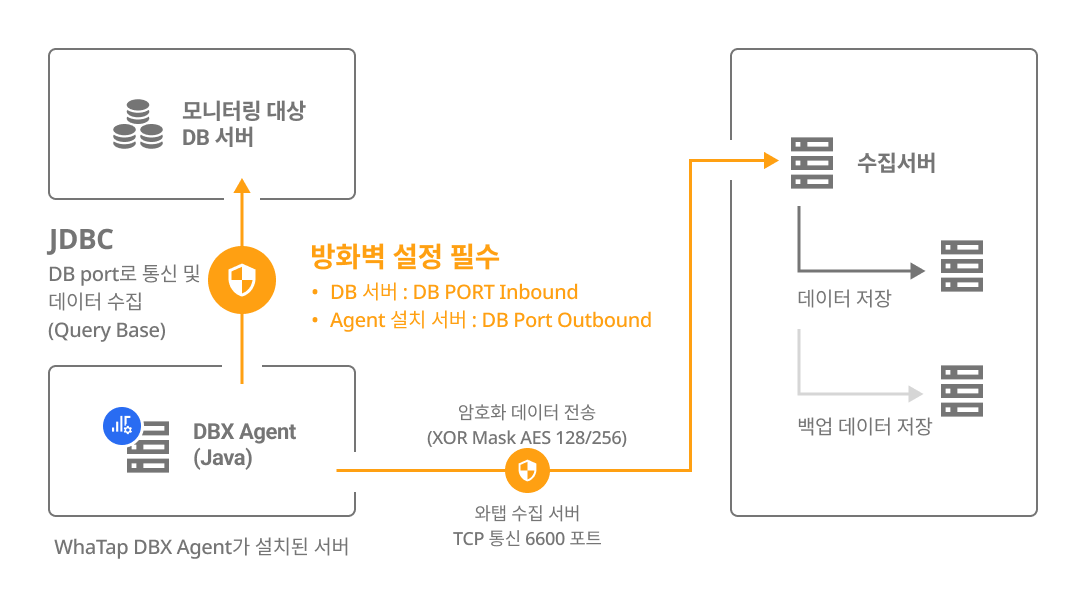
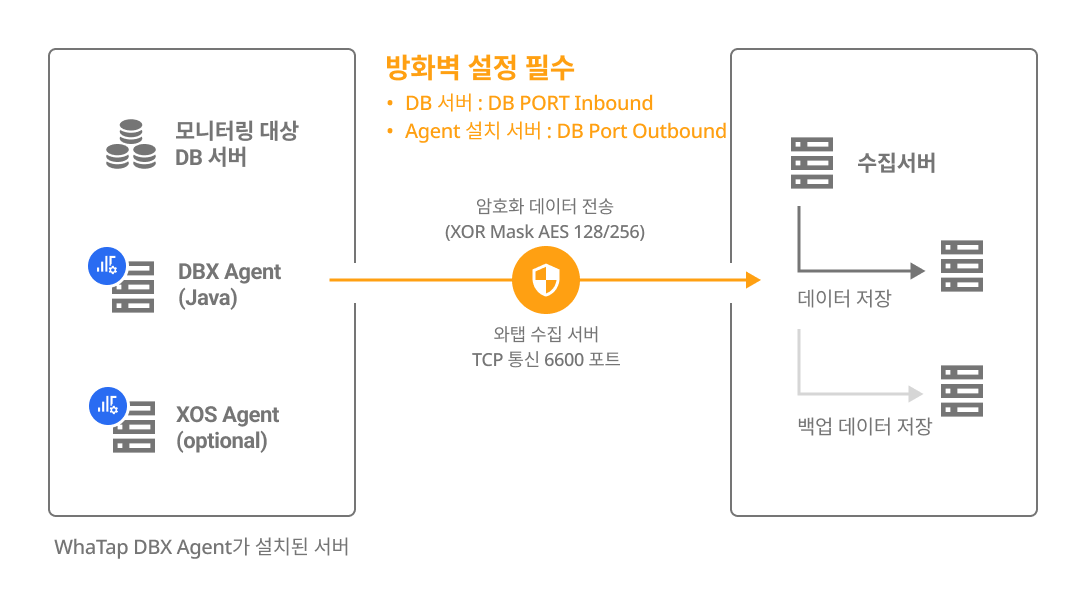
DBX 에이전트는 별도 서버에 설치하거나 DB 서버에 설치할 수 있습니다. 설치할 방식을 선택하고 구성과 방화벽을 확인하세요.
| 별도 서버에 설치 | DB 서버에 같이 설치 |
|---|---|
|
|
계정 생성
데이터베이스 모니터링을 하기 위해 필요한 권한을 가진 계정을 생성하세요. root(admin) 계정으로 로그인해 계정을 생성하세요.
-
일반적인 경우
SQLcreate user {DB_User} identified by {DB_Password};
grant create session to {DB_User};
grant select any dictionary to {DB_User}; -
멀티 테넌트 DB(Oracle 12c 이상)에서 기본 모니터링을 사용할 경우:
c##계정 생성SQLcreate user c##{DB_User} identified by "{DB_Password}";
grant create session to c##{DB_User};
grant select any dictionary to c##{DB_User};
alter user c##{DB_User} set container_data = ALL container = CURRENT; -
kill session 기능을 사용할 경우
SQLgrant alter system to {DB_User}
-
멀티 테넌트 DB에서 kill session 기능을 사용할 경우:
c##계정으로 실행SQLgrant alter system to c##whatap container=all;
-
히든 파라미터를 조회할 경우
SQLcreate view sys.whatap_vw_ksppi as select * from sys.x$ksppi;
grant select on sys.whatap_vw_ksppi to {DB_User};
create synonym {DB_User}.whatap_vw_ksppi for sys.whatap_vw_ksppi;
create view sys.whatap_vw_ksppcv as select * from sys.x$ksppcv;
grant select on sys.whatap_vw_ksppcv to {DB_User};
create synonym {DB_User}.whatap_vw_ksppcv for sys.whatap_vw_ksppcv;
-
연결 분석 기능을 사용할 경우
SQLgrant select on sys.v_$session to {Appication_service_account};
권한에 따른 지원 기능 살펴보기
기본 권한 외의 권한은 사용자의 환경에 따라 부여하지 않아도 됩니다. 단, 일부 기능이 동작하지 않을 수 있습니다.
| 권한 | command (Single DB) | command (Multitenant DB) | 메뉴 및 기능 | 상세 내역 |
|---|---|---|---|---|
| 기본 권한 | grant create session to whatap; | grant create session to c##whatap; | 접속 | - |
grant select any dictionary to whatap; | grant select any dictionary to c##whatap; | 인스턴스 모니터링 / 멀티 인스턴스 모니터링 / SQL 통계 | 개별 권한 부여 시 다음 표 내용 참조 | |
| - | alter user c##whatap set container_data = ALL container = CURRENT; | 멀티태넌트 DB를 사용하는 경우(12C 이상) pdb 조회를 위한 필수 권한임 | ||
| 세션 킬 | grant alter system to whatap; | grant alter system to c##whatap container=all; | 액티브 세션 > 세션 킬 | - |
| 히든 파라미터 조회 | create view sys.whatap_vw_ksppi as select * from sys.x$ksppi;grant select on sys.whatap_vw_ksppi to DB_User;create synonym DB_User.whatap_vw_ksppi for sys.whatap_vw_ksppi; | 파라미터 조회 메뉴에 히든 파라미터 내용 포함 | 히든 파라미터를 조회하려면 별도의 뷰/시노님 생성 및 권한 부여 필요 | |
create view sys.whatap_vw_ksppcv as select * from sys.x$ksppcv;grant select on sys.whatap_vw_ksppcv to DB_User;create synonym DB_User.whatap_vw_ksppcv for sys.whatap_vw_ksppcv; | ||||
select any dictionary 대신 다음 권한을 개별로 부여해도 됩니다.
| 권한 | command (Single DB) | command (Multitenant DB) |
|---|---|---|
| 액티브 세션 / 락 트리 / 지표 정보 | grant select on v_$sqlarea to whatap; | grant select on v_$sqlarea to c##whatap; |
grant select on v_$transaction to whatap; | grant select on v_$transaction to c##whatap; | |
grant select on v_$instance to whatap; | grant select on v_$instance to c##whatap; | |
grant select on v_$sysstat to whatap; | grant select on v_$sysstat to c##whatap; | |
grant select on v_$lock to whatap; | grant select on v_$lock to c##whatap; | |
grant select on v_$sesstat to whatap; | grant select on v_$sesstat to c##whatap; | |
grant select on v_$event_name to whatap; | grant select on v_$event_name to c##whatap; | |
grant select on v_$session to whatap; | grant select on v_$session to c##whatap; | |
grant select on v_$sql to whatap; | grant select on v_$sql to c##whatap; | |
grant select on v_$process to whatap; | grant select on v_$process to c##whatap; | |
grant select on v_$statname to whatap; | grant select on v_$statname to c##whatap; | |
grant select on v_$system_event to whatap; | grant select on v_$system_event to c##whatap; | |
grant select on v_$osstat to whatap; | grant select on v_$osstat to c##whatap; | |
grant select on v_$px_session to whatap; | grant select on v_$px_session to c##whatap; | |
grant select on v_$sga to whatap; | grant select on v_$sga to c##whatap; | |
| - | grant select on v_$con_sysstat to c##whatap; | |
| 파라미터 정보 | grant select on v_$parameter to whatap; | grant select on v_$parameter to c##whatap; |
| Wait 정보 / Event 정보 | grant select on v_$event_name to whatap; | grant select on v_$event_name to c##whatap; |
grant select on v_$system_event to whatap | grant select on v_$con_system_event to c##whatap; | |
grant select on v_$system_wait_class to whatap; | grant select on v_$system_wait_class to c##whatap; | |
| - | grant select on v_$con_system_wait_class to c##whatap; | |
| Tablespace 정보 | grant select on dba_data_files to whatap; | grant select on cdb_data_files to c##whatap; |
grant select on dba_free_space to whatap; | grant select on cdb_free_space to c##whatap; | |
grant select on dba_temp_files to whatap; | grant select on v_$sort_segment to c##whatap; | |
grant select on v_$temp_extent_pool to whatap; | grant select on v_$tempfile to c##whatap; | |
grant select on v_$containers to whatap; (12c 이상) | grant select on v_$containers to c##whatap; |
-
이미 있는 계정을 사용하고 싶다면 DB 유저 파일 생성으로 넘어가세요. 권한이 없을 경우 모니터링을 시작할 수 없습니다.
-
예시 코드에서
whatap은 DB 사용자 계정 이름입니다. 사용자가 이용하는 사용자 계정 이름으로 변경하세요.
- 예시 코드의
DB_Password에는 사용자 비밀번호를 입력하세요.
액세스 키 확인
액세스 키는 와탭 서비스 활성화를 위한 고유 ID입니다.
설치 안내 섹션에서 프로젝트 액세스 키 발급받기 버튼을 선택하세요. 액세스 키를 자동으로 발급받은 후 다음 단계를 진행합니다.
프로젝트를 생성한 후, 자동으로 에이전트 설치 페이지로 이동합니다. 에이전트 설치 페이지로 이동하지 않는다면 화면 왼쪽 메뉴에서 관리 > 에이전트 설치를 선택하세요.
DBX 에이전트 다운로드
DBX 에이전트 파일을 다운로드하세요. 다음 두 가지 방법을 이용하세요.
-
wget명령어를 이용해 다운로드할 수 있습니다.BASHwget -O whatap.agent.database.tar.gz "https://service.whatap.io/download/dbx_agent?type=oracle&format=tar.gz" -
명령어로 다운로드할 수 없다면 와탭 모니터링 서비스 화면에서 다운로드 버튼을 선택하세요.
DBX 에이전트 파일을 다운로드한 다음 압축을 해제하세요.
tar -zxvf whatap.agent.database.tar.gz
보안 설정으로 인해 tar 형식의 파일을 다운로드할 수 없는 사용자를 위해 ZIP 형식의 파일도 함께 제공합니다. 설치 화면에서 .zip 다운로드 버튼을 선택하세요.
DBX 에이전트 설정
에이전트 설치 화면의 안내에 따라 에이전트 설정을 진행하세요. 화면에 각 항목마다 필요한 정보를 입력하면 설정 내용 및 명령어를 자동 완성할 수 있습니다.
whatap.conf 설정
압축을 해제한 폴더로 이동해 whatap.conf 파일을 확인하세요. whatap.conf 파일에 프로젝트 액세스 키 정보 및 와탭 서버 정보, db 접속 정보를 입력하세요.
license={AccessKey}
whatap.server.host=13.124.11.223/13.209.172.35 # WhaTap server information

dbms=oracle
db={DB_Name(SID)}
db_ip={DB_Server_IP}
db_port={DB_Server_Port}

exclude_background=3
JDBC 다운로드
압축 파일을 해제한 DBX 에이전트 경로에 데이터베이스 서버의 운영체제와 버전에 맞는 JDBC 드라이버를 다운로드하세요. /압축을 해제한 폴더/jdbc
Oracle 10g R2 버전 이상: https://www.oracle.com/database/technologies/appdev/jdbc-downloads.html
/압축해제한 폴더/jdbc/README.md 파일에서 각 데이터베이스별 JDBC 드라이버 설치 경로를 확인할 수도 있습니다.
DB 접속 정보 암호화(UID 생성 및 갱신)
데이터베이스 모니터링을 위해 2번 단계에서 생성한 DB 모니터링 계정 정보를 에이전트에 안전하게 등록해야 합니다. 와탭은 DB 접속 정보를 암호화된 UID 형태로 저장하며, 에이전트는 이 UID를 이용하여 DB에 접속합니다.
username과 password를 입력한 뒤 다음 스크립트를 실행하세요.
비밀번호 변경 시 반드시 재실행
DB 모니터링 계정의 비밀번호가 변경된 경우, 반드시 본 단계를 다시 수행해야 합니다.
UID는 DB 접속 정보를 암호화한 값이므로,
비밀번호 변경 후 UID를 갱신하지 않으면 DB 접속 오류로 인해 모니터링 데이터 수집이 중단됩니다.
- Linux
- Windows
./uid.sh {DB_USER} {DB_PASSWORD}
-
최초 1회 UID를 생성하면, 이후에는 암호화된 UID를 통해 DB 서버로부터 성능 데이터를 수집합니다.
-
UID 파일을 생성하기 위해서는 프로젝트 액세스 키가 whatap.conf 파일에 설정되어 있어야 합니다. 액세스 키 확인
-
Azure Database 환경의 경우
DB_USER는DB_USER@DB_name형식으로 입력해야 합니다. -
DB_USER또는DB_PASSWORD에 특수문자가 포함된 경우, 특수문자 앞에 Escape 문자(\)를 입력하세요.Example./uid.sh whatap whatap\!pwd
# 특수문자가 2개 이상일 경우 각각 이스케이프 문자 추가
./uid.sh whatap whatap\!\@pwd
uid.bat "DB_USER" "DB_PASSWORD"
-
최초 1회 UID를 생성하면, 이후에는 암호화된 UID를 통해 DB 서버로부터 성능 데이터를 수집합니다.
-
UID 파일을 생성하기 위해서는 프로젝트 액세스 키가 whatap.conf 파일에 설정되어 있어야 합니다. 액세스 키 확인
-
Azure Database 환경의 경우
DB_USER는DB_USER@DB_name형식으로 입력해야 합니다. -
Windows에서는 패스워드의 특수 문자에 Escape 문자(
\)가 필요 없습니다. 다만, 패스워드에 큰 따옴표(")를 사용할 때에는 필요합니다.
디폴트 플랜 조회하기
디폴트 플랜 유저 파일 생성 시 에이전트가 사전 정의된 DB 정보를 사용하여 플랜을 자동으로 조회하도록 설정할 수 있습니다.
- Linux
- Windows
-
에이전트 설정(whatap.conf) 파일에
plan_db옵션을 추가하고 DB 이름을 입력하세요.whatap.confplan_db=(dbname) -
DB 설정 후
planuid.sh스크립트를 사용하여 사용자 및 비밀번호를 설정하세요../planuid.sh user pwd노트사용자(
user)와 비밀번호(pwd)에 특수 문자가 포함되어 있는 경우 각 특수 문자 앞에 역슬래시(\)를 추가하세요.예.
user$example→user\$example
-
에이전트 설정(whatap.conf) 파일에
plan_db옵션을 추가하고 DB 이름을 입력하세요.whatap.confplan_db=(dbname) -
DB 설정 후
planuid.bat스크립트를 사용하여 사용자 및 비밀번호를 설정하세요.planuid.bat user pwd
모니터링 시작하기
에이전트를 설치한 경로에서 쉘 스크립트(또는 배치 파일)를 실행하세요.
- Linux
- Windows
./start.sh
데몬처럼 사용하고 싶은 경우에는 다음 명령어를 실행하세요. 단 nohup을 설치한 환경에서만 동작합니다.
./startd.sh
start.bat
화면에 표시된 실행 로그에 에러가 없는지 확인하고, 대시보드 화면(인스턴스 목록)에 차트가 정상 표시되는지 확인하세요. 이상이 없다면 Ctrl+C를 눌러 실행을 종료하고, 다음 순서에 따라 윈도우 서비스에 등록하세요.
서비스 등록하기
다음 명령어를 실행해 서비스를 등록하세요.
install_WindowsService.bat create WhatapDBXAgent
서비스를 등록하면 Windows의 서비스 관리 도구에서 아래와 같이 확인할 수 있습니다. 해당 서비스를 찾아 마우스 오른쪽 버튼으로 클릭하고, 시작(Start) 옵션을 선택해 서비스를 시작하세요.
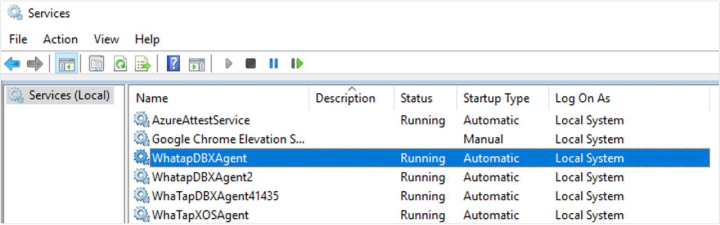
제어판 > Windows 도구 > 서비스(services.msc)에서 WhatapDBXAgent 서비스를 시작하거나 중지할 수 있습니다. 사용하는 Windows 버전에 따라 서비스 경로는 다를 수 있습니다.
서비스 삭제하기
다음 명령어를 실행해 서비스를 삭제할 수 있습니다.
install_WindowsService.bat delete WhatapDBXAgent
데이터베이스 모니터링을 위한 에이전트 설치를 완료했습니다. 다음 문서에서 설치 후 점검 사항을 확인하세요.
부가 에이전트(XOS) 설치 및 기타 옵션 적용하기
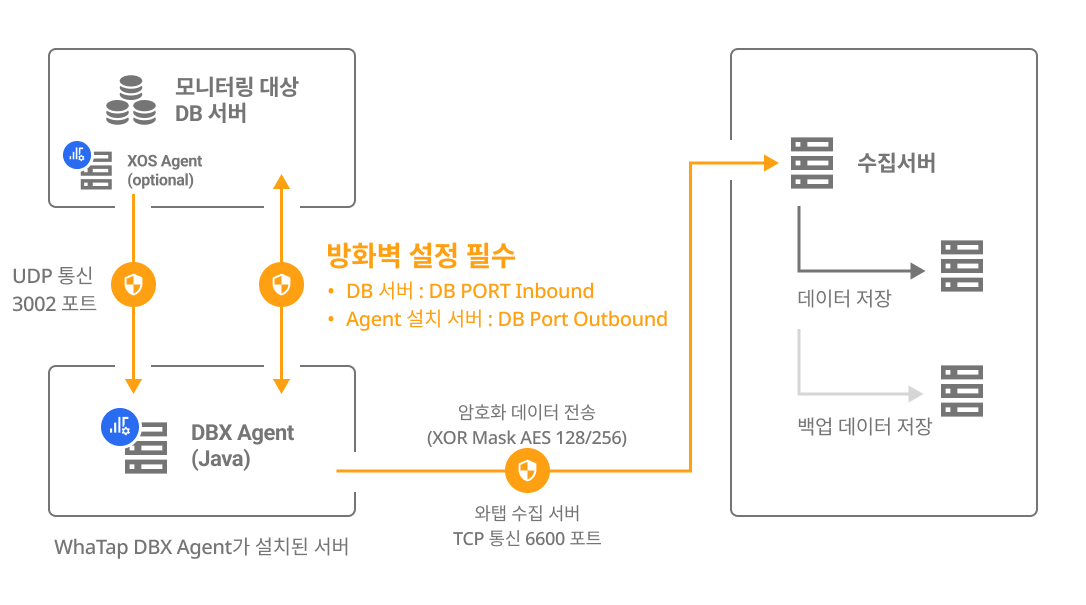
데이터베이스 서버의 자원을 추가로 모니터링하려면 데이터베이스 서버에 별도의 XOS 에이전트를 실행해 데이터를 수집할 수 있습니다.
whatap.conf 파일 설정하기
DBX 에이전트가 설치된 경로의 whatap.conf 파일에 다음 옵션을 설정하세요.
xos=1
xos_port=3002
xos 폴더(/압축 해제 폴더/xos/)를 데이터베이스 서버로 이동하세요.
xos.conf 파일 설정하기
데이터베이스 서버로 이동한 xos 경로의 xos.conf 파일에 다음 옵션을 설정하세요.
dbx_ip={DB_Agent_IP}
dbx_port=3002 # default 3002
cpu_limit=0
mem_limit=10240
에이전트 설치 메뉴에서 DB Agent IP, DB Agent Port 항목에 DB 정보를 입력하면 에이전트 옵션을 자동 생성할 수 있습니다.
XOS 에이전트 실행하기
- Linux
- Windows
XOS 에이전트를 실행하세요.
./start.sh
-
DBX 에이전트로 모니터링한 데이터를 전송하기 위해
dbx_port로 설정한 포트(default 3002)가 열려 있어야 합니다. (UDP Outbound) -
XOS 에이전트를 백그라운드로 실행하려면 ./startd.sh 파일을 실행하세요.
xos 폴더의 배치 파일로 에이전트를 실행하세요.
start.bat
화면에 표시되는 실행 로그에 에러가 없는지 확인하고 실행을 종료한 후, 다음 순서에 따라 서비스에 등록하세요.
msvcp120.dll, msvcr120.dll 누락 시 해결 방법
xos 에이전트 실행 중 msvcp120.dll와 msvcr120.dll 파일이 누락되어 실행할 수 없다면, Microsoft Visual C++ 2013 Redistributable 2013이 설치되지 않았거나 손상되었기 때문입니다. Microsoft Visual C++ 2013 Redistributable 패키지를 설치하여 문제를 해결할 수 있습니다.
다음 링크에서 자신의 시스템 환경에 맞는 패키지를 다운로드하여 설치하세요.
Microsoft Visual C++ 2013 Redistributable (x64)
- vcredist_x64.exe: 64비트 프로그램 실행용
-
서비스 등록
xos 폴더에 있는 install_WindowsService.bat 파일을 다음과 같이 실행하여 서비스에 등록하세요. 만약
create옵션 다음에 이름을 입력하지 않으면 WhatapXOSAgent 이름으로 서비스에 기본 등록됩니다.install_WindowsService.bat create WhatapXOSAgent -
서비스 삭제
install_WindowsService.bat delete WhatapXOSAgent
DBX 에이전트로 모니터링한 데이터를 전송하기 위해 dbx_port로 설정한 포트(default 3002)가 열려 있어야 합니다. (UDP Outbound)
다음 단계
-
설치 점검하기
프로젝트 생성 및 에이전트 설치, 기본 에이전트 옵션까지 모두 적용했다면 다음 문서에서 점검 사항을 확인하세요.
-
설치 문제 해결
에이전트 설치 시 발생할 수 있는 다양한 문제들과 이를 해결하기 위한 구체적인 지침을 제공합니다. 자세한 내용은 다음 문서를 참조하세요.
-
에이전트 설정
에이전트 설정(whatap.conf) 파일에 옵션을 적용해 모니터링을 위한 다양한 기능을 제공합니다. 자세한 내용은 다음 문서를 참조하세요.
데이터베이스 서버 자원을 추가로 모니터링하려면 부가 에이전트(XOS)에 추가 옵션을 설정하세요. 자세한 내용은 다음 문서를 참조하세요.
-
클라우드 설정
클라우드 서비스에서 제공하는 모니터링 지표를 데이터베이스 프로젝트의 대시보드에서 추가로 수집하고 모니터링하려면 다음 문서를 참조하세요.
-
모니터링 시작하기
모든 설정을 완료한 다음 데이터베이스 서버의 지표를 에이전트가 정보를 수집하기 시작합니다. 먼저 인스턴스 목록 메뉴에서 모니터링 데이터가 수집되는지 확인하세요. 인스턴스 목록에 대한 자세한 내용은 다음 문서를 참조하세요.