외부 프로젝트 연동과 설정
와탭 쿠버네티스 에이전트 1.7.16 버전 이상이 필요합니다.
와탭은 다양한 모니터링 서비스를 프로젝트 단위로 제공합니다. 외부 프로젝트 연동 기능을 통해 쿠버네티스 프로젝트의 Pod와 연관된 외부 프로젝트를 연동할 수 있습니다.
외부 프로젝트 연동을 위해서는 쿠버네티스 에이전트 설정 및 연동 대상 Pod 설정이 필요합니다. 쿠버네티스 프로젝트와 외부 프로젝트를 연동하여 통합적인 모니터링 체계를 구축해 보세요.
외부 프로젝트 연동
외부 프로젝트 연동 기능 활성화 시 다음과 같이 연동된 컨테이너 및 Pod에 해당 프로젝트 로고가 표시됩니다. 이를 통해 어떤 외부 프로젝트와 연동되었는지 시각적으로 쉽게 식별할 수 있습니다. 또한 해당 블록을 클릭하여 요약 보기 패널 내 버튼을 통해 해당 프로젝트로 이동할 수 있습니다.
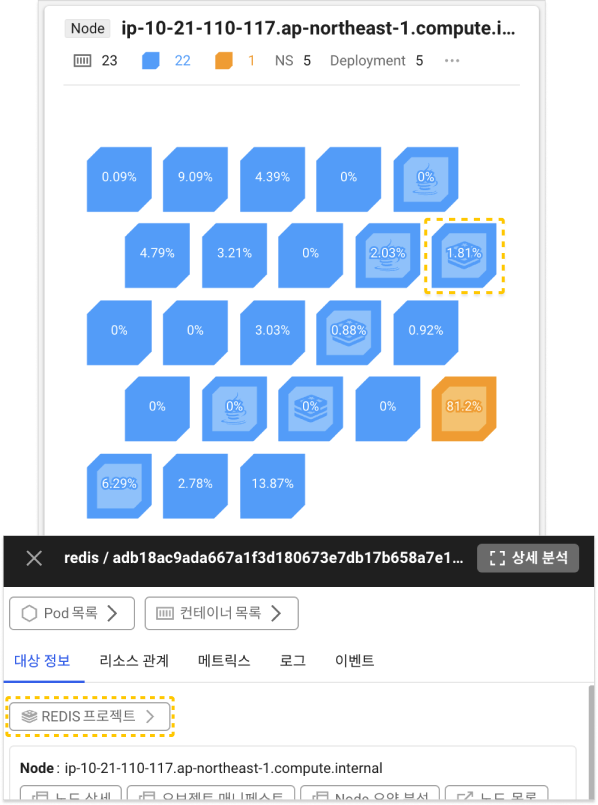
외부 프로젝트 설정
에이전트 설정
쿠버네티스 에이전트의 설치 YAML 파일에서 whatap-monitoring 네임스페이스의 whatap-node-agent DaemonSet 설정을 변경해야 합니다. 특히, whatap-node-agent 컨테이너의 env 섹션에 다음 환경 변수를 추가해야 합니다.
- name: "collect_foreign_project"
  value: "true"
예시
다음은 환경변수가 추가된 YAML 파일의 예시입니다. 실제 운영 환경의 YAML 파일과 많은 차이가 있을 수 있기에 예시를 참고하여 필요한 부분만 수정 후 사용하세요. 하이라이팅된 라인이 추가된 환경 변수입니다.
apiVersion: "apps/v1"
kind: "DaemonSet"
metadata:
  labels:
    name: "whatap-node-agent"
  name: "whatap-node-agent"
  namespace: "whatap-monitoring"
spec:
  selector:
    matchLabels:
      name: "whatap-node-agent"
  template:
    metadata:
      labels:
        name: "whatap-node-agent"
    spec:
      containers:
      - command:
        - "/data/agent/node/cadvisor_helper"
        - "-port"
        - "6801"
        env:
        - name: "NODE_NAME"
          valueFrom:
            fieldRef:
              fieldPath: "spec.nodeName"
        image: "whatap/kube_mon_dev:foreign-2"
        name: "whatap-node-helper"
        ports:
        - containerPort: 6801
          name: "helperport"
        resources:
          limits:
            cpu: "200m"
            memory: "350Mi"
          requests:
            cpu: "100m"
            memory: "100Mi"
        volumeMounts:
        - mountPath: "/rootfs"
          name: "rootfs"
          readOnly: true
        - mountPath: "/sys"
          name: "hostsys"
          readOnly: true
        - mountPath: "/dev/disk"
          name: "hostdiskdevice"
          readOnly: true
        - mountPath: "/run/containerd/containerd.sock"
          name: "containerddomainsocket"
      - command:
        - "/bin/entrypoint.sh"
        env:
        - name: "NODE_IP"
          valueFrom:
            fieldRef:
              fieldPath: "status.hostIP"
        - name: "NODE_NAME"
          valueFrom:
            fieldRef:
              fieldPath: "spec.nodeName"
        - name: "WHATAP_LICENSE"
          value: "x6050rs80f4eg-x1g0egm9rjb3mg-z7p9533a2ea87e"
        - name: "WHATAP_HOST"
          value: "13.124.11.223/13.209.172.35"
        - name: "WHATAP_PORT"
          value: "6600"
        - name: "HOST_PREFIX"
          value: "/rootfs"
        - name: "WHATP_MEM_LIMIT"
          valueFrom:
            resourceFieldRef:
              containerName: "whatap-node-agent"
              resource: "limits.memory"
        - name: "collect_foreign_project"
          value: "true"
        image: "whatap/kube_mon_dev:foreign-2"
        name: "whatap-node-agent"
        ports:
        - containerPort: 6600
          name: "nodeport"
        resources:
          limits:
            cpu: "200m"
            memory: "350Mi"
          requests:
            cpu: "100m"
            memory: "300Mi"
        volumeMounts:
        - mountPath: "/rootfs"
          name: "rootfs"
          readOnly: true
        - mountPath: "/bin/entrypoint.sh"
          name: "start-script-volume"
          readOnly: true
          subPath: "entrypoint.sh"
        - mountPath: "/whatap_conf"
          name: "whatap-config-volume"
      initContainers:
      - command:
        - "/data/agent/tools/whatap_debugger"
        - "run"
        image: "whatap/kube_mon_dev:foreign-2"
        name: "whatap-node-debug"
        volumeMounts:
        - mountPath: "/rootfs"
          name: "rootfs"
          readOnly: true
      serviceAccount: "whatap"
      tolerations:
      - effect: "NoSchedule"
        key: "node-role.kubernetes.io/master"
      - effect: "NoSchedule"
        key: "node-role.kubernetes.io/control-plane"
      volumes:
      - hostPath:
          path: "/"
        name: "rootfs"
      - hostPath:
          path: "/sys"
        name: "hostsys"
      - hostPath:
          path: "/dev/disk"
        name: "hostdiskdevice"
      - configMap:
          defaultMode: 448
          name: "node-start-script"
        name: "start-script-volume"
      - emptyDir: {}
        name: "whatap-config-volume"
      - hostPath:
          path: "/run/containerd/containerd.sock"
        name: "containerddomainsocket"
연동 대상 Pod 설정
연동하려는 Pod의 설정을 수정하세요. 예를 들어 Redis Pod를 연동하려는 경우 Redis 컨테이너의 env 섹션에 다음 환경 변수를 추가해야 합니다.
- name: "license"
  value: "here_is_whatap_license"
- name: "whatap_platform"
  value: "redis"
-
here_is_whatap_license: 외부 프로젝트의 라이선스 정보를 입력하세요. -
whatap_platform: 연동하려는 외부 프로젝트의 플랫폼을 입력하세요.
현재 외부 프로젝트 연동을 지원하는 플랫폼은 다음과 같습니다. 플랫폼 입력 시 대소문자 구분없이 입력할 수 있습니다.
Redis, Java, Node.js, Python, PHP
예시
다음은 Redis Pod 설정에 환경 변수를 추가한 YAML 파일의 예시입니다. 하이라이팅된 라인이 추가된 환경 변수입니다.
apiVersion: apps/v1
kind: StatefulSet
metadata:
  name: redis-cluster
  namespace: backend
spec:
  serviceName: redis-cluster-svc
  replicas: 6
  selector:
    matchLabels:
      app: redis-cluster
  template:
    metadata:
      labels:
        app: redis-cluster
    spec:
      containers:
      - name: redis
        image: redis:5.0.1-alpine
        ports:
        - containerPort: 6379
          name: client
        - containerPort: 16379
          name: gossip
        command: ["/conf/update-node.sh", "redis-server", "/conf/redis.conf"]
        env:
        - name: POD_IP
          valueFrom:
            fieldRef:
              fieldPath: status.podIP
        - name: license
          value: x6050s081i709-z2lhh7gpi3bdr4-x7jovr61kumi5k
        - name: whatap_platform
          value: redis
        volumeMounts:
        - name: conf
          mountPath: /conf
          readOnly: false
        - name: data
          mountPath: /data
          readOnly: false
외부 프로젝트 연동 확인
분석 > 메트릭스 조회
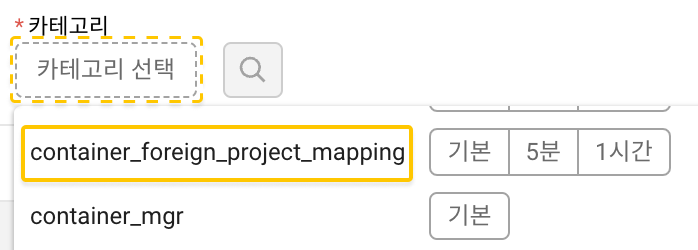
외부 프로젝트 연동 설정 후 메트릭스 조회 메뉴로 이동하세요. 예시 이미지와 같이 카테고리 선택 버튼 클릭하세요.
다음 카테고리가 표시된다면 연동이 정상적으로 적용된 상태입니다.
container_foreign_project_mapping